
In this article, we explain how to link the Parro agenda to your own calendar in various systems.
Google/Android
- How do I link the calendar to my Google calendar?
- How do I make the calendar visible on my Android device?
- How do I remove/unlink the calendar from Google/Android?
iPhone/iOS
- How do I link the calendar in an iPad and iPhone calendar from iOS 15?
- How do I remove/unlink the calendar on iOS?
Outlook
- How do I link this to my Outlook calendar?
- How do I unlink the calendar in Outlook?
- How do I link this to my Outlook Live (Hotmail) calendar?
- How can I delete/unlink the calendar at Outlook.com?
All systems
- Synchronization times
Google/Android
How do I link the calendar to my Google calendar?
By granting Google access to your Parro calendar, you agree to Google's terms of service (https://policies.google.com/terms?hl=en&gl=us).
It is best to do this on a laptop/computer or tablet. (On your mobile, the calendar app opens by default, and this is unfortunately not possible).
Preparation:
- Go to the web version of Parro: talk.parro.com
- Log in to Parro
- Go to Settings
- Click on Link Calendar
- Click on Get Started
- Copy the link by clicking on it
Through Open the Explanation you can return to this article.
P.S. You can press the Confetti! button as many times as you want 😉
Linking:
- Go to accounts.google.com
- Log in with your Google account if it hasn't happened automatically
- Click the icon with the nine dots in the top right (Google Apps)
- Then click on Calendar. If Calendar is not listed, click on More from Google (at the bottom) to search for and add the Calendar
- In the left column, click the plus sign behind Other calendars
- Choose the option From URL
- Paste the copied URL from Parro into the input field Calendar URL
- Click on Add Calendar
Note: Google calendar syncs within 24 hours with Parro. Sometimes more frequently, sometimes only after a week. Unfortunately, we cannot do anything about this.
How do I make the calendar visible on my Android device?
Note!
Due to the wide variety of Android devices, the steps below may vary by device.
- First, go to your Google Calendar app
- Open your Android calendar, click on the three horizontal lines in the top left, and click at the bottom on Sync Now or Refresh
- Now the new Parro calendar from your Google account will be displayed. Check this, and click on OK or go back to your calendar
How do I remove/unlink the calendar from Google/Android?
- Go to accounts.google.com on your computer
- Log in with your Google account if it hasn't happened automatically
- Click the icon with the nine dots in the top right (Google Apps)
- Then click on Calendar. If Calendar is not listed, click on More from Google (at the bottom) to search for and add the Calendar
- Hover your mouse over the Parro calendar
- You will then see a cross that allows you to remove the link
iPhone/iOS
How do I link the calendar in an iPad and iPhone calendar from iOS 15?
Preparation:
- Open the Parro app
- Go to Settings
- Click on Link Calendar
- Click on Get Started
- Copy the link
Through Open the Explanation you can return to this article.
P.S. You can press the Confetti! button as many times as you want 😉
Linking
In the Calendar app, you can set up multiple calendars so that you can keep track of different types of activities. You can keep all your activities and appointments in one calendar, but you can also easily set up additional calendars, a great way to keep your planning organized.
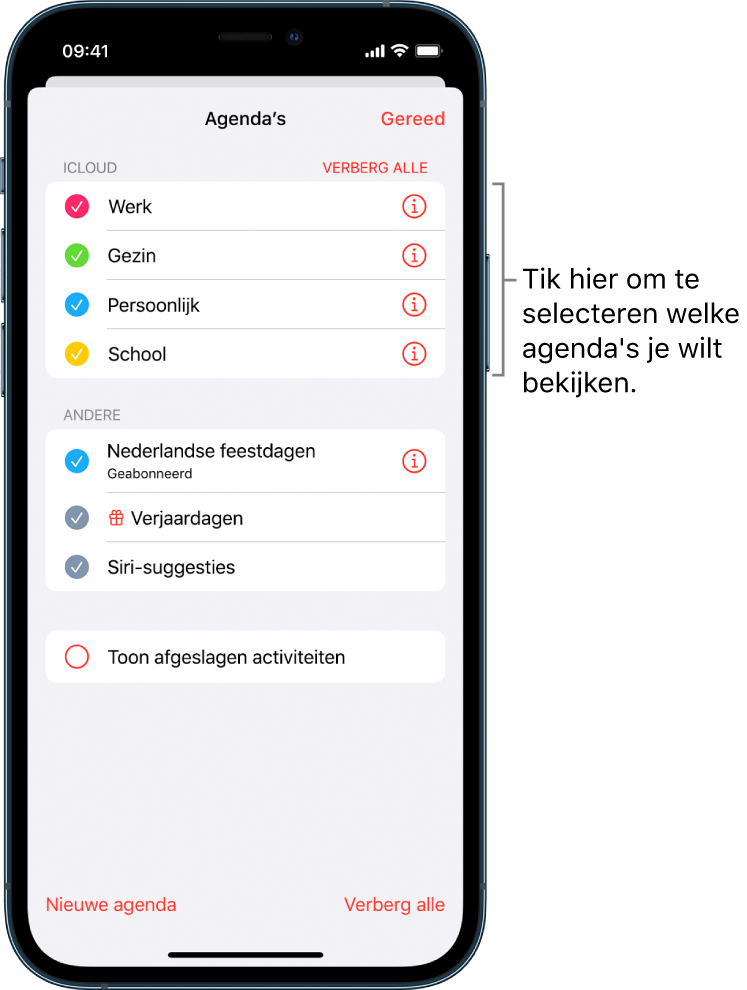
- Open your calendar app
- Click on Calendars at the bottom of the screen
- Then click on New Calendar
- Click on Add Calendar Subscription. Paste the copied URL from Parro and click on Subscribe
How do I remove the calendar on iOS?
- Open your calendar app
- Click on Calendars at the bottom of the screen
- Click on the info icon next to the calendar you want to unsubscribe from
- Click on Unsubscribe and then click on Unsubscribe
Outlook
How do I link this to my Outlook calendar?
Preparation:
- Open the Parro app
- Go to Settings
- Click on Link Calendar
- Click on Get Started
- Copy the link
Through Open the Explanation you can return to this article.
P.S. You can press the Confetti! button as many times as you want 😉
Linking
- Open Outlook and go to your calendar
- Click on Open Calendar > From Internet
- Paste the copied URL
- Click OK
- Click Yes
- The Parro calendar is now under Other Calendars
Note:
- For Outlook 2010 and Outlook 2013: Parro is automatically synchronized along with your email
- Outlook webmail syncs within 10 minutes with Parro
- The Outlook Live calendar via Outlook.com syncs once a day with Parro
How do I unlink the calendar in Outlook?
- Open Outlook and go to your calendar
- Right-click on the Parro calendar
- Choose to delete the calendar
How do I link this to my Outlook Live (Hotmail) calendar?
For synchronization, you first need to copy a link from Parro. Read above in Preparation how to do that.
- Go to https://www.outlook.com and log in with your Microsoft Live account (formerly Hotmail)
- Click the icon at the top of the page as indicated below (click on All Apps if necessary) and choose Calendar
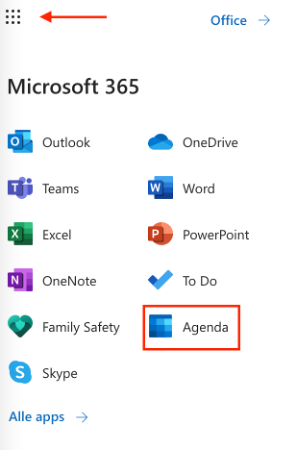
- Your calendar is open. Click on the left side on Add Calendar and then click on Subscribe from Web. Enter the link in the URL field (paste with Ctrl-V)
- Give your calendar a name and choose a color and optionally an icon
- Click on Import
Your calendar has now been created.
How can I delete/unlink the calendar at Outlook.com?
- Go to https://www.outlook.com and log in with your Microsoft Live account (formerly Hotmail)
- Click the icon at the top of the page as indicated below (click on All Apps if necessary) and choose Calendar
- Hover your mouse over the Parro calendar and click on the 3 dots that appear
- Click on Delete
All systems
Synchronization times
For all digital calendars, they have their own synchronization times. This means that it may take a while for your calendar to be updated.
- Google Calendar: within 24 hours, sometimes more frequently, sometimes only after a week. Unfortunately, we cannot do anything about this.
- Outlook Live calendar via Outlook.com: once a day
- Outlook 2010 and Outlook 2013: automatically synchronized along with your email
- Outlook webmail: within 10 minutes
- iPhone / iPad: within 10 minutes
- Windows Phone: within 24 hours
Comments
0 comments
Please sign in to leave a comment.